EU Subsidies

The Lithuanian beekeeping sector

Start of the 2025 application period:
From February 2, 2026, to March 6, 2026

Commercial Offers

If you are interested in purchasing a honey extractor, please feel free to contact us by email at INFO@MEDSUKIAI.LT  , and we will send you a quote.

Rules for Support

Support for the Lithuanian Beekeeping Sector, 2023–2027. Application Period: February 2, 2026, through March 6, 2026
More information about support at  Paramakaimui.lt

The application and the required documents must be signed with an electronic signature and submitted no later than 12:00 a.m. on the last day of the call for applications. The application and required documents may also be signed and submitted by an authorized representative. The authorized representative must also submit a power of attorney certified by a notary or a power of attorney in which the authenticity of the signature has been certified by the village head.

A Brief Guide to Signing Documents Electronically

Once we've received all the commercial documents, we'll go to the NMA website:
https://www.paramakaimui.lt/index.php/parama/lietuvos-zemes-ukio-ir-kaimo-pletros-20232027-metu-strateginis-planas/priemoniu-sarasas/parama-bitininkystes-sektoriui-2026-m/47756?tab=1
Once you open this page, you'll need to download the forms required to submit your application.

Document Title
Paraiškos forma (51.09 KB) 
Paraiškos pildymo instrukcija (59.52 KB)
 
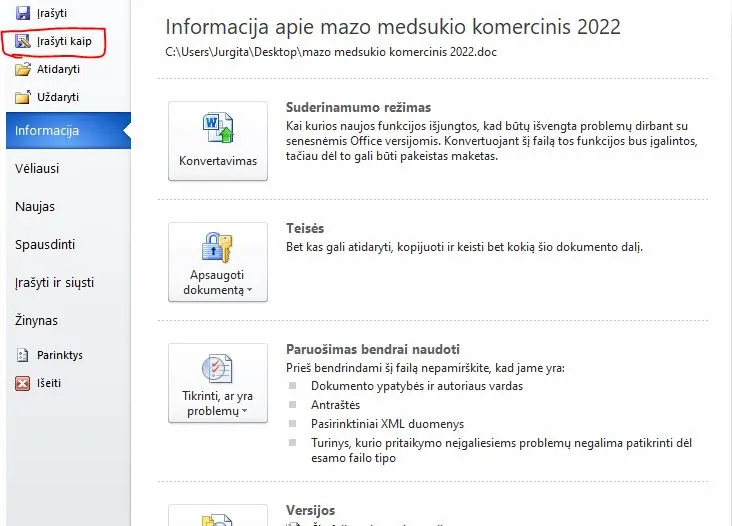
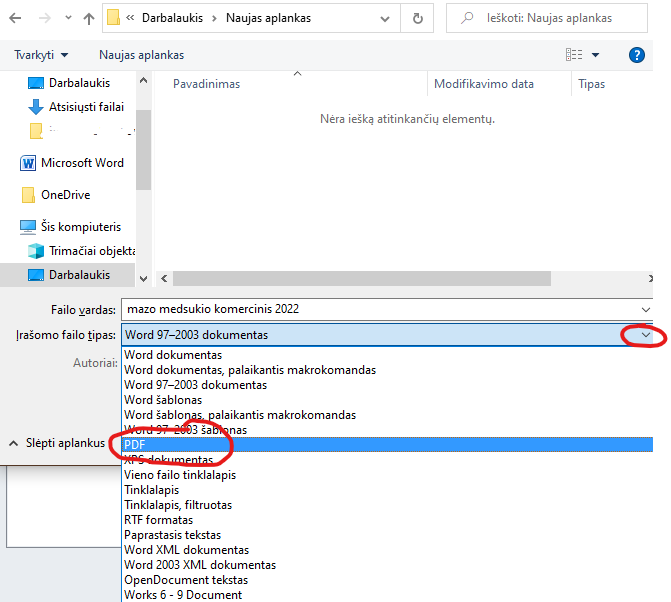
After downloading these documents, we need to fill them out on the computer and save them in PDF format (click “Save As,” then in the dialog box that opens below the file name, select “File Type” and choose PDF).

METHOD 1: If you already have a qualified digital signature certificate and know how to save a completed form as a PDF, try signing it.

Let's go to https://www.gosign.lt/lt/
Spaudžiame Prisijungti.
Pasirenkame prisijungimo būdą: Mobilusis elektroninis parašas.
Įvedame savo asmens kodą and telefono numerį.
Spaudžiame Jungtis.
Sistemai užklausus telefone įvedame SIM kortelėje nurodytą sPIN1 kodą.
Spaudžiame PRISIJUNGTI.
Naujo dokumento įkėlimui spaudžiame Iš kompiuterio.
Įkėlus dokumentą spaudžiame užrašą Mano parašas su violetine ikona.
 Užpildome grafas (tai nėra būtina) PaskirtisPasirašymo vietaKontaktinė informacija.
Pasirenkame Parašo atvaizdo vietą (tai nėra būtina, bet pasirinkus – parašo atvaizdas neturi uždengti dokumento teksto).
Būtinai paliekame varnelę Pridėti laiko žymę!
Ir spaudžiame – Pasirašyti su: Mobiliuoju telefonu.
Sistemai užklausus telefone įvedame SIM kortelėje nurodytą sPIN2 kodą.
 Dokumentas pasirašytas.
Tuomet spaudžiame Atsisiųsti – Išsaugoti dokumentą Į kompiuterį.
Taip pasirašę visus dokumentus galime siųsti adresu dokumentai@nma.lt
Ir baigus darbą būtina IŠEITI (dešiniajame viršutiniame kampe).
2- BŪDAS: Užpildžius einam į https://www.dokobit.com/lt/ spaudžiam prisijungti (prisijungiam su m. Parašu ARBA SMART ID)

Spaudžiame Prisijungti.
Pasirenkame prisijungimo būdą: Mobilusis elektroninis parašas ARBA SMART ID. 
Spaudžiame Prisijugti.
Spaudžiame ĮKELTI DOKUMENTĄ.
Pasirenkam PDF ir spaudžiam UŽVILKITE IR PALEIKITE DOKUMENTUS ČIA
PVZ
Įkėlus paeinam žemyn ir spaudžiam PEREITI PRIE PASIRAŠYMO
 Atsidarius naujam lange einam į 4 punktą ir pasirenkam pasirašyti su Mob. parašu Or pasirašyti ” SMAR-ID” priemone (pažymėta raudonai) ir spaudžiam PASIRAŠYTI
PVZ

 Sėkmingai pasirašius vėl einam į 4 punktą ir atsisiunčiam pasirašytus dokumentus. (paryškinta raudonai)
 
PVZ
Taip pasirašę visus dokumentus (nepamirškit visų dokumentų ir komercinių pasiūlymų) galime siųsti adresu: dokumentai@nma.lt